Research · 7 min read
Why AI product videos get the size wrong, and how to check it
AI generators don't know how big your product is, so they guess from the product type. In our test, four image generators drew a 41 cm massage roller at a median 1.47 times its real size, while a familiar tote bag came out within 10%. Writing the real size into the prompt barely helped.
 Alexander MurzanaevCo-founder, Quelta Published Facts checked
Key takeaways
- In our November 2026 test, four image generators drew a 41 cm massage roller at a median 1.47× its real size next to a 168 cm woman. None of 32 frames came within 10% of true size.
- A familiar product came out right: a tote bag was drawn at a median 1.03×, with 24 of 27 frames within 10%. Generators know common products and guess at the rest.
- Real dimensions in the prompt moved the roller only from 1.48× to 1.45× on median. A prompt describes the size; nothing in the generator checks it.
- Image-to-video models animate the first frame they are given, so a size error in that frame carries into the whole clip, and every new shot can add another one.
- What works is measurement: build the product at its real dimensions first, check every frame against it and regenerate the frames that drift.
AI video for product pages has gone mainstream. Alibaba says its content tools for merchants generate about 5 million videos a month, and its video feature works from just a few product photos. TikTok Shop’s seller center has a tool that turns product images into shoppable videos. Before a catalog team puts such a video next to the Add to cart button, one question is worth a number: is the product the right size?
We tested it.
How far off is the size in AI product images?
Far enough to see without a ruler. We gave four widely used image generators the same job: a woman stands full-length and holds a product. Two products, two prompts, four takes each: 64 frames. Then we measured the product against the woman in every frame.
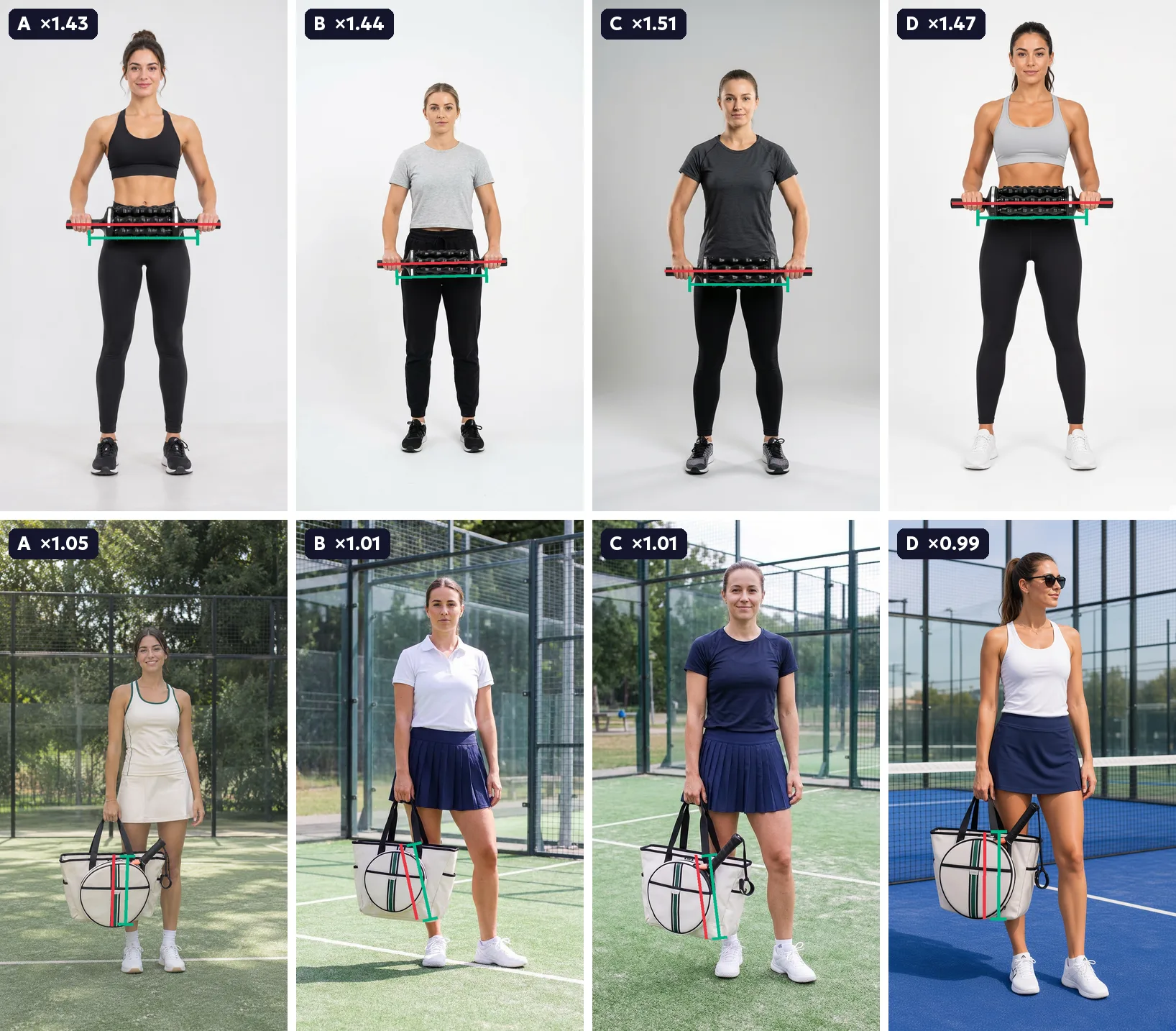
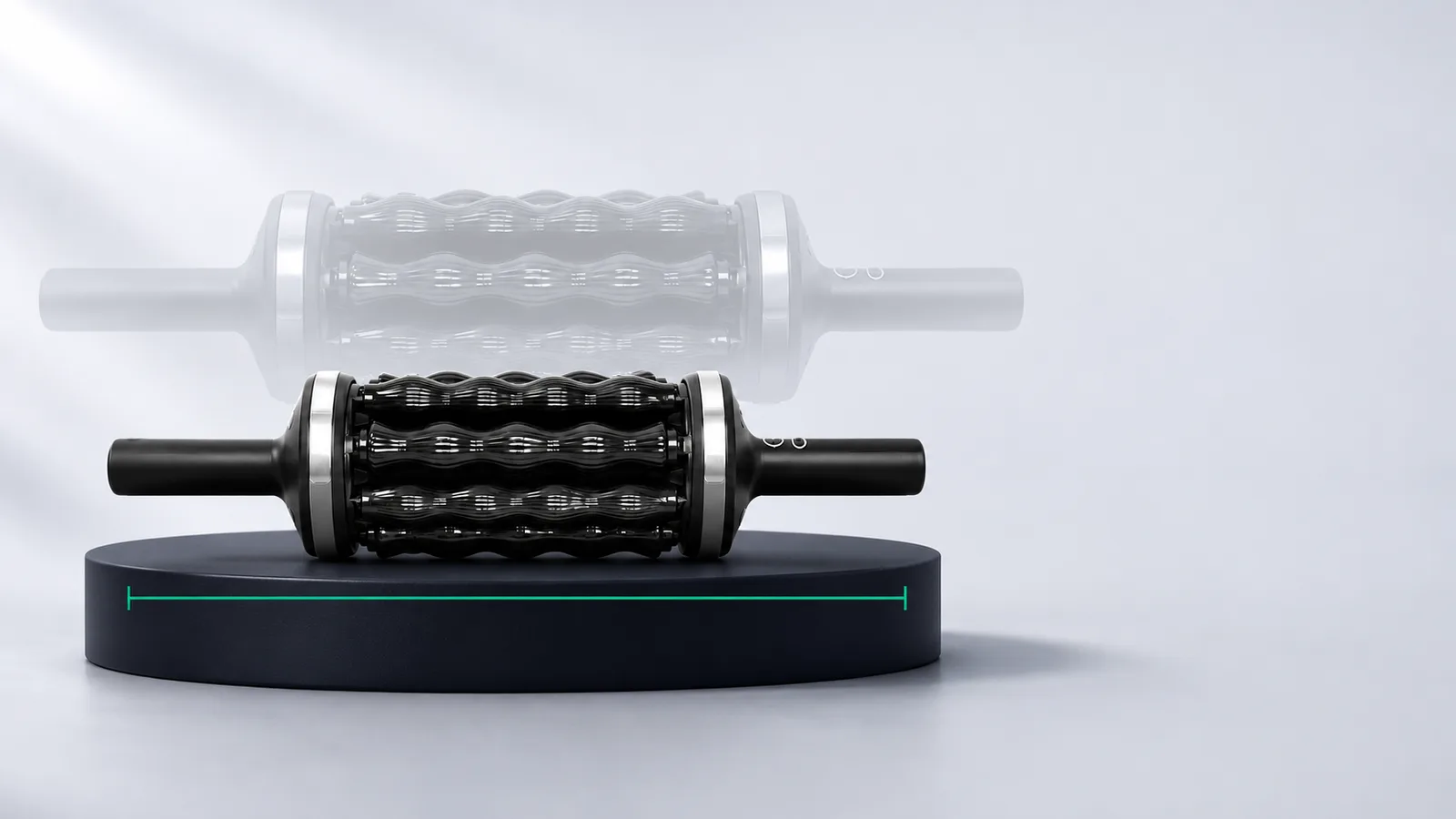
The roller is a powered massage roller from a fitness brand we made test videos for. It is 40.8 cm from one handle tip to the other, so next to a 168 cm woman it should be a little wider than her shoulders. The generators drew it at a median 1.47 times that length, anywhere from 1.15× to 1.72×. Not one of 32 frames came within 10% of the real size.
The tote bag behaved differently. Its body is 33.2 cm tall, and the generators drew it at a median 1.03×. 24 of 27 frames landed within 10%.
Data table
| Product · prompt | Frames | Median size | Range | Within 10% |
|---|---|---|---|---|
| Massage roller, 41 cm, no sizes in the prompt | 16 | ×1.48 | ×1.39–×1.72 | 0 of 16 |
| Massage roller, 41 cm, real sizes in the prompt | 16 | ×1.45 | ×1.15–×1.66 | 0 of 16 |
| Padel tote bag, 33 cm tall, no sizes in the prompt | 13 | ×1.04 | ×0.93–×1.11 | 11 of 13 |
| Padel tote bag, 33 cm tall, real sizes in the prompt | 14 | ×1.01 | ×0.96–×1.11 | 13 of 14 |
Why does AI get some products right and others wrong?
A generator learns what things look like, and how big they are, from the photos it was trained on. Tote bags appear next to people in a huge number of photos, so the model has a firm sense of their size. A powered massage roller with two handles is far rarer. The model has to infer its size from what the product resembles.
The reference photo doesn’t help. A packshot on a white background has no scale: nothing in it says whether the roller is 40 cm or 70 cm long. So the generator falls back on the closest product type it knows. Our roller has a ribbed drum and two straight handles held with both hands, which puts it close to gym equipment. That part is our reading of the results. The test shows that the size is wrong, not why.
What the test does show is that the error is systematic. All four generators missed in the same direction and by a similar amount: their medians for the roller were 1.44×, 1.44×, 1.49× and 1.52×. When four different systems agree on the wrong answer, generating one more take won’t fix it.
For a catalog, this is the uncomfortable part. Generators do well on common products, and common products are where AI video adds little. New, technical or unusual products are the ones that need video, and a generator knows little about them.
Does writing the dimensions in the prompt help?
Barely. With the real sizes in the prompt (“the roller is 41 cm long… the woman is 168 cm tall. Keep these real proportions exactly”), the roller’s median moved from 1.48× to 1.45×. The closest single frame reached 1.15×, but 12 of the 16 frames with sizes in the prompt were still more than 30% too big.
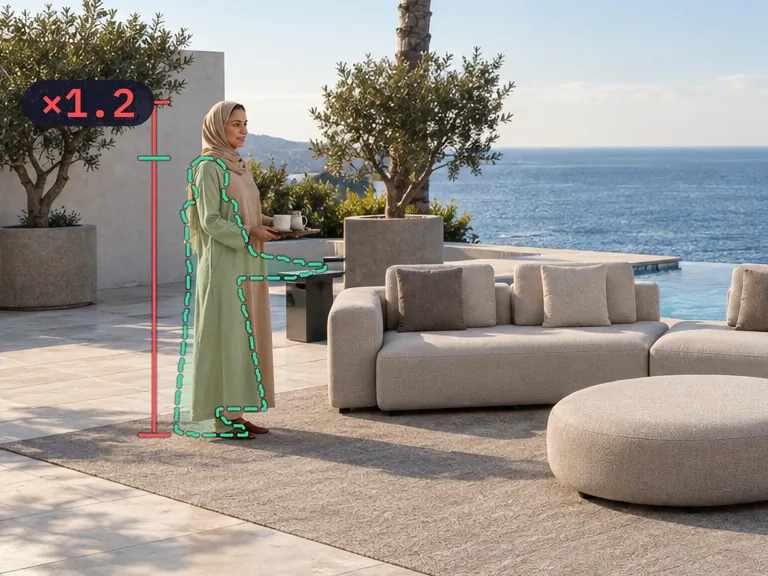
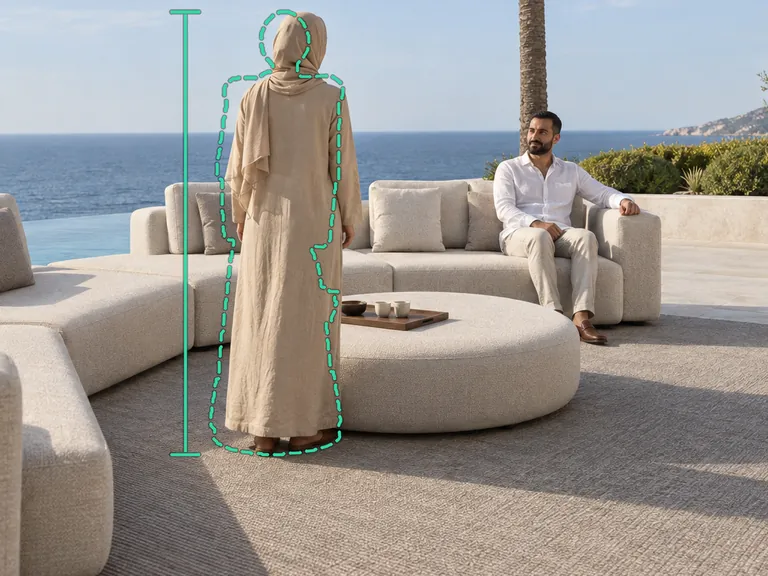
We had seen the same in production before this test. In one frame, the prompt gave a woman’s height in centimeters, and the generator still drew her about 1.2 times too tall for the sofa next to her.
 Generator
 Quelta
A prompt describes the size. Nothing in the generator checks it.
Where else does size break in a product video?
The first frame is only where the problems start. Most AI product videos are made in two steps: a generator draws a still frame with the product, then an image-to-video model animates it. The video model takes that first frame as given, so a size error in it runs through the whole clip. After that, three more kinds of errors appear:
- Between shots. Every shot is drawn again from scratch, so a sofa can grow and shrink from one shot to the next.
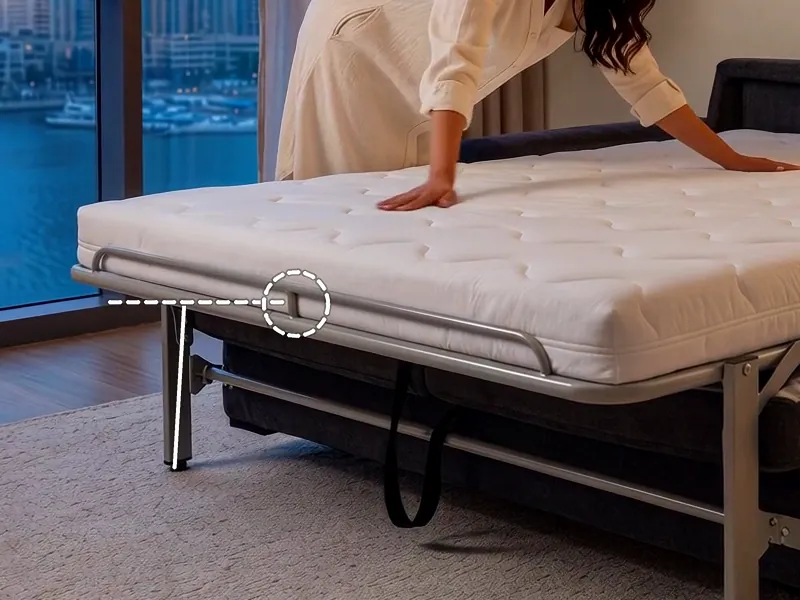
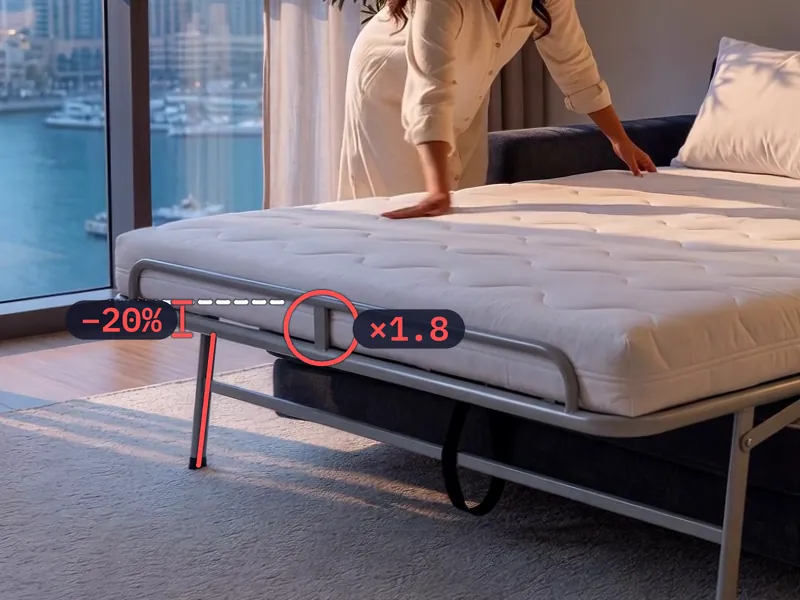
- Between angles. Seen from another side, the product no longer matches itself. In one of our tests, two shots of the same bed in a row disagreed: in the second, the rail post was 1.8 times taller and the frame sat 20% lower. Each frame looked fine on its own.
- Inside a shot. When a hand picks the product up or the camera moves, the product can stretch, lose a part or change its proportions between the first and the last frame.
 Shot 1
 Shot 2
This matters because video on a product page is there to set expectations. Amazon tells sellers that video on product pages can decrease returns by more than 40%, based on its internal data for 2022. That only works if the video shows the product as it is. In a survey by Salsify of 1,910 U.S. and U.K. shoppers, 71% said they had returned an item because of incorrect product content.
How to check an AI product video before it goes live
Measure, don’t eyeball. A product that is 20% too big looks normal on its own; you only see it next to something whose size you know. Pick a frame, find a reference in it, such as a person, a hand, a door or a table, and measure both in pixels. Any image viewer shows pixel coordinates.
Size is the first check. These are all eight we run on every frame before a video leaves our production. The file itself, its length, format and resolution for each marketplace, is a separate check: our free video requirements checker runs it in the browser.
If a vendor’s video fails the first two checks, ask how they set the size, not for a revision. A revision is another guess.
How we keep the size right in production
This is the problem our engine was built around. Before any frame is generated, it builds a simple 3D block-out of the product at its real dimensions, from the product photos and the sizes on the product page. The block-out fixes the size and proportions; the look of the product comes from the photos. Every frame is generated around the product’s outline and then checked against the model and the photos: size, shape, number of parts, logo and color. A frame that fails is regenerated.
The check is what makes it hold. For one product video for a fitness brand, we generated 53 candidate frames for 15 shots with the 3D guide. Only 27 of them, about half, stayed within 6 pixels of the guide’s outline at a frame width of 1,080 pixels. Keeping the closest take for each shot put 14 of 15 shots within 6 pixels, with a median of 3. Without the check, half of the frames would have reached the video with the product off.

You can see more product videos made this way on our samples page.
What to ask before you order AI product video
The answers to five questions tell you whether a vendor controls the product’s size or hopes for it.
| Question | A good answer | A red flag |
|---|---|---|
| Where does the product’s size come from? | From real dimensions, set before anything is generated | “We describe it in the prompt” |
| How is the size checked? | In every frame, with a number and a tolerance | “Our team watches every video” |
| What happens to a frame that drifts? | It is regenerated before you see the video | You find it in review and ask for a revision |
| Will the product match across videos? | Yes: one product model is reused for every video | Every video is generated from scratch |
| Can you show one product in three videos side by side? | Yes, on your own product | Only single showcase videos |
If you want to see the answers on your own catalog, we start with a pilot on 3–5 products: send a link to your catalog, and judge the videos against your own product pages. How this works for a whole catalog is on our page for marketplaces.
Sources
- Quelta scale test, November 5, 2026: per-frame measurements (CSV)
- Salsify, 2025 Consumer Research Executive Summary (survey of 1,910 U.S. and U.K. shoppers, October 2024)
- Amazon, Amazon Shoppable Videos: guide for sellers (US, December 2024)
- Amazon, How to add videos to product pages
- Alibaba Group, AI Powers Large-scale Applications at the World's Largest Shopping Festival (October 2025)
- TikTok Shop Seller University: making shoppable videos from product images
Alexander Murzanaev
Co-founder, Quelta
Alexander has been building IT products since 2009. He is a co-founder of Quelta and the founder of AppCraft, a studio of 70+ specialists that builds custom software and AI systems for business.
