Research · 7 min read
Can AI keep the logo and label on your product? We read every frame
The letters, yes; the label, half the time. We turned photos of four labeled products into 20 videos with five AI video generators and read every frame. Not one letter was misspelled, but 10 of 20 clips broke the label: they added text the product doesn't have, or cut the label off.
 Yegor IsaevCo-founder, Quelta Published Facts checked
Key takeaways
- In our November 2026 test, two vision models read 684 lines of label text in 228 frames of 20 AI product videos. Not one line had a misspelled letter.
- The label still broke in 10 of 20 clips: 6 added fine print, barcodes or a second logo the product doesn't have, and 4 cut the label off, left it blank or moved it to another side.
- Added text appears on the sides the photo doesn't show. On a drink can, 4 of 5 generators drew fine print or a barcode on its back within 5 seconds.
- Defects come late: the first one appeared at a median 3.3 seconds into the clip and never in the first second. The first frame of an image-to-video clip is your own photo, so check the last one.
- The camera move mattered more than the generator: the generator that mostly pushed in kept all 4 labels clean, and the one that turned the camera furthest kept none. That is our reading of 20 clips.
Most AI product videos start from a product photo. An image-to-video generator takes the photo as the first frame and animates it. If the product has a label, a brand manager wants one thing settled before the video goes next to the Add to cart button: does the label still say what it says on the shelf?
We tested it and read every frame.
Can AI video keep the logo and label on a product?
It kept the letters and lost the label. We made four products with brands we invented, each with a three-line label: an olive oil bottle, a serum box, a coffee pouch and a drink can. Five widely used video generators turned each photo into a 5-second clip with the same slow camera move, 20 clips in all. Then two vision models read the label in every frame, every half second.
Not one letter changed. Across 684 readings of a brand name, a product name or a size, no line came back misspelled, garbled or with an invented letter. In 523 of 624 readings after the first frame, the whole line was in view and every letter matched the photo. In the other 101, part of the line had turned out of view.
The label broke anyway. In 10 of 20 clips, something happened to it that a shopper would notice and a brand would reject.
What goes wrong with the label, if not the letters?
Three things went wrong in the 10 broken clips:
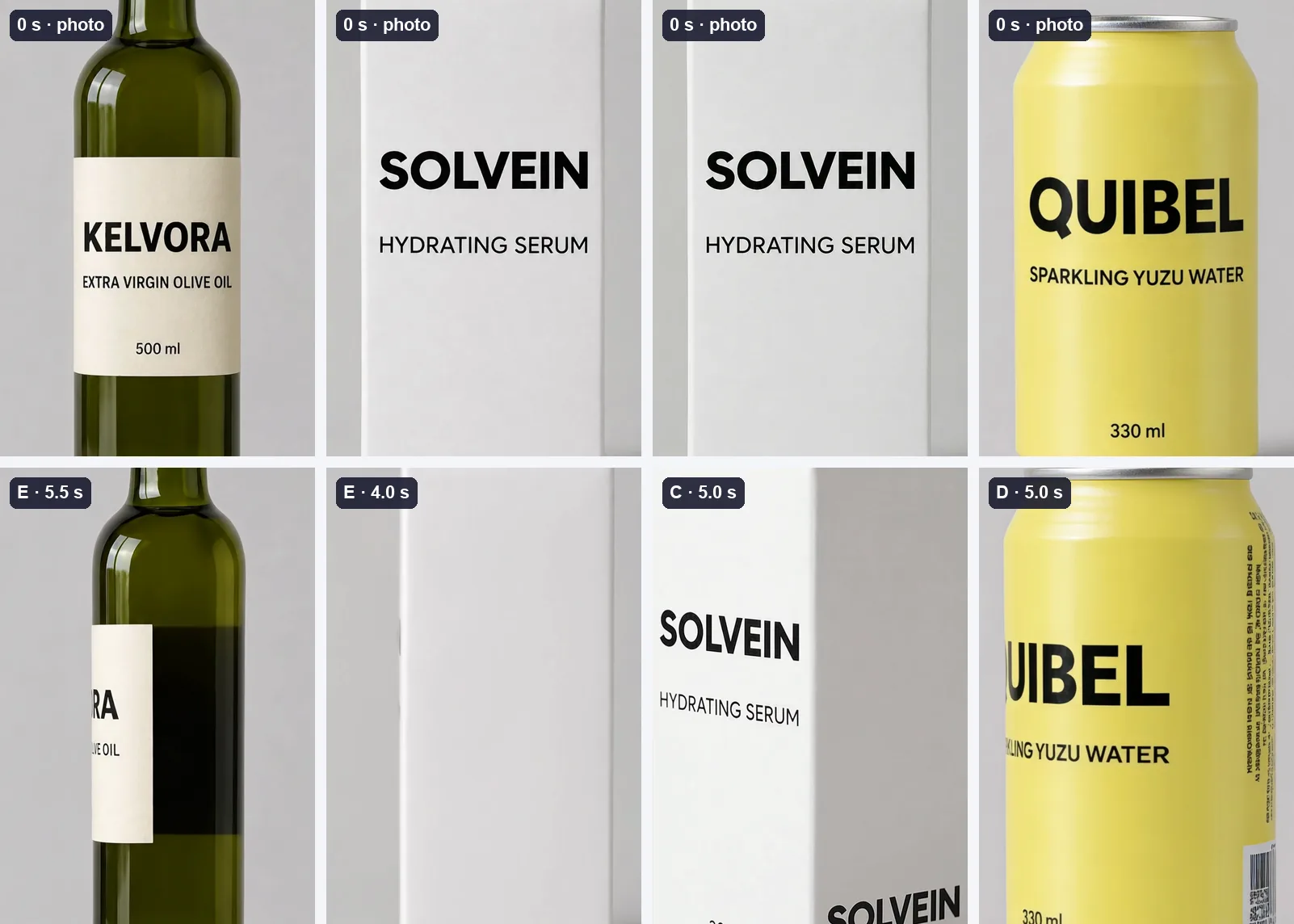
- Text the product doesn’t have (6 clips). As the camera turned, generators drew fine print, barcodes, small icons and, on one box, a second logo on sides the photo never showed.
- A cut label (3 clips). Two generators shrank the bottle’s label into a strip next to a dark band, so letters vanished while the glass behind them stayed in view. A third turned the coffee pouch sideways and back; it returned with a zipper it never had, and the edge of its own label clipped the brand name.
- A moved label (1 clip). The text slid off the front of the serum box, the front panel went blank at 4.0 seconds, and the logo reappeared on the side panel.
The drink can shows the pattern most clearly. Its photo has three lines of text on the front and nothing else, because nothing else is in view. Four of five generators filled the back of the can with packaging text they made up.
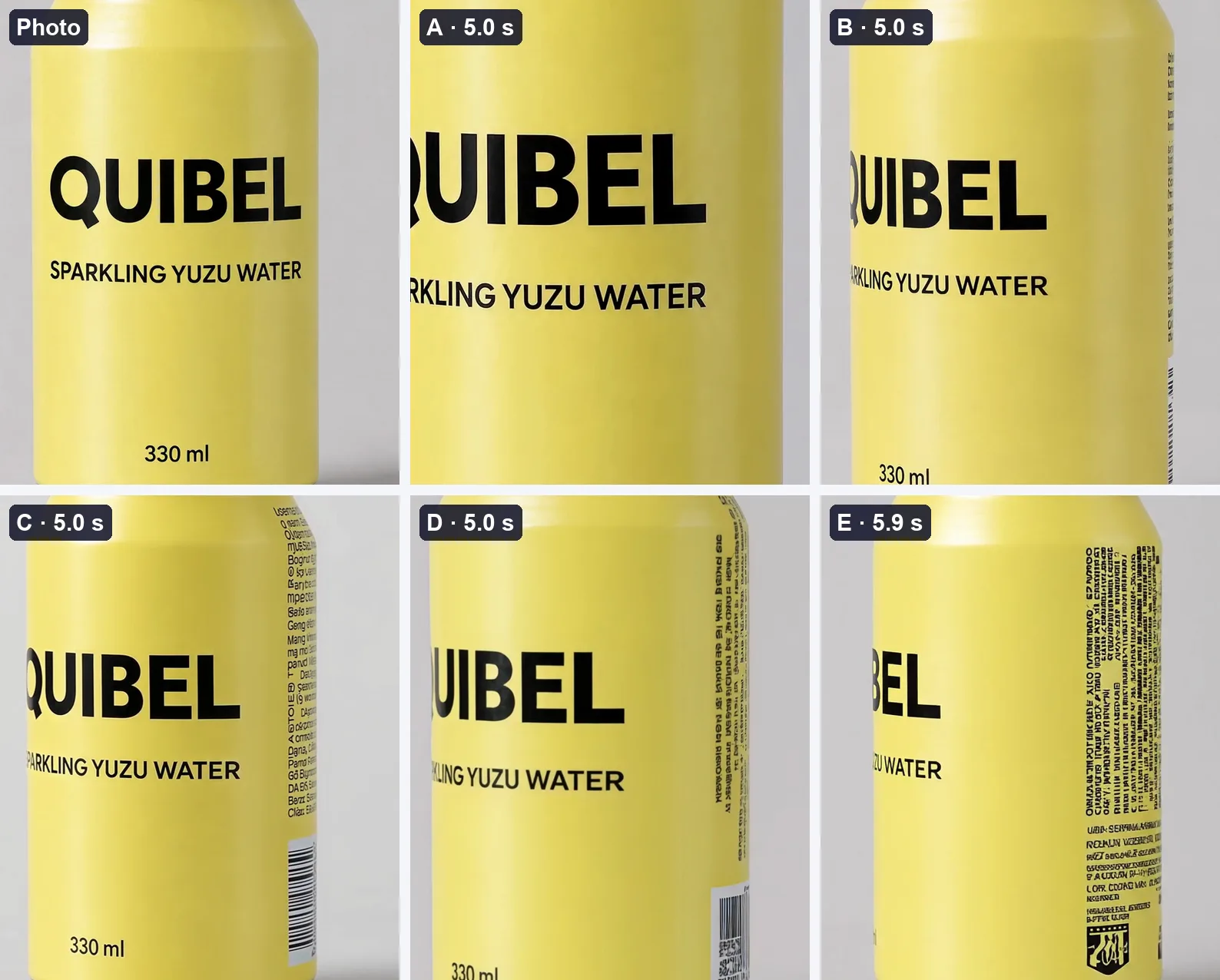
Our reading: a generator knows only the side of the product in the photo. When the camera turns, it has to draw the rest, and the back of most packaging it has seen carries fine print and a barcode, so that is what it draws. On food and cosmetics, the back of the pack is where the ingredients and legal text go. A video that shows made-up text there shows a product you don’t sell.
Shoppers notice when a product doesn’t match its page. In a survey by Salsify of 1,910 U.S. and U.K. shoppers, 71% said they had returned an item because of incorrect product content.
Which part of the label breaks first: the logo, the name or the small print?
None of them broke by spelling. What differed was how often each line stayed whole in view. After the first frame, the brand name was fully in view and right in 171 of 208 frames, the product name in 157 and the size line in 195.
The product name was the longest line on every label, so it was the first to wrap out of view around a curved bottle or can as the camera turned. The size line was the shortest and sat in the center of the label, so it held up most often. Small type didn’t fail for being small: at 720p, the size line read correctly in every frame where it was in view. We didn’t test anything smaller than a size line, such as an ingredient list.
When does the label start to break?
Late, and that is the trap. The first defect appeared at a median 3.3 seconds into a clip. The earliest came at 1.5 seconds, and none came in the first second. Of the 208 frames after the first, 136 showed the whole label right, 21 had part of a line out of view and 51 showed a defect.
Data table
| Product | Generator | Label | From | What happened |
|---|---|---|---|---|
| Olive oil bottle | A | Clean | – | Every line right in every frame where it was in view; nothing added. |
| Olive oil bottle | B | Clean | – | Every line right in every frame where it was in view; nothing added. |
| Olive oil bottle | C | Clean | – | Every line right in every frame where it was in view; nothing added. |
| Olive oil bottle | D | Label cut | 2.5 s | a dark band eats the right part of the label; the first letter disappears while the glass behind it is in view |
| Olive oil bottle | E | Label cut | 2.5 s | the label shrinks into a strip next to a dark band; by the last frame only RA is left |
| Serum box | A | Clean | – | Every line right in every frame where it was in view; nothing added. |
| Serum box | B | Clean | – | Every line right in every frame where it was in view; nothing added. |
| Serum box | C | Text added | 1.5 s | a second SOLVEIN logo appears on the side panel |
| Serum box | D | Clean | – | Every line right in every frame where it was in view; nothing added. |
| Serum box | E | Label moved | 3.5 s | the text slides off the front panel, the front panel is blank at 4.0 s, the logo reappears on the side panel |
| Coffee pouch | A | Clean | – | Every line right in every frame where it was in view; nothing added. |
| Coffee pouch | B | Clean | – | Every line right in every frame where it was in view; nothing added. |
| Coffee pouch | C | Clean | – | Every line right in every frame where it was in view; nothing added. |
| Coffee pouch | D | Label cut | 4.0 s | the bag turns sideways and back with a new zipper and a flat bottom; the brand word is clipped by its own label edge |
| Coffee pouch | E | Text added | 5.9 s | fine print appears on the side gusset |
| Drink can | A | Clean | – | Every line right in every frame where it was in view; nothing added. |
| Drink can | B | Text added | 4.5 s | columns of fine print appear on the side of the can |
| Drink can | C | Text added | 3.0 s | fine print and a barcode appear on the side |
| Drink can | D | Text added | 2.5 s | a barcode appears, then fine print and small icons |
| Drink can | E | Text added | 3.5 s | a block of fine print and an emblem appear on the side |
So the first frame proves nothing. It is your own photo, so it always passes. A reviewer who checks the opening of a clip and scrubs past the rest would have missed every defect in this test. Shorter clips have less time to drift: in our test, a 2-second clip would have avoided 9 of the 10 defects.
Do some AI video generators keep labels better than others?
In this test, yes, though the camera move explains most of it. Generator A kept all 4 labels clean, B kept 3, C kept 2, D kept 1 and E kept none. Generator A mostly pushed in and barely circled the products, so little of their unseen sides came into view. Generator E turned the camera the furthest: by the end of its clip, the coffee pouch was in profile.
So we don’t read the ranking as “use Generator A.” We read it as “the less of the product a generator has to invent, the more of the label survives.” The products point the same way. The can, round and with the most new surface turning into view, stayed clean in 1 of 5 clips; the bottle, the box and the pouch in 3 of 5 each. That part is our reading of the results. The ranking itself is a snapshot of November 2026, one clip per product and generator.
How to check the label in an AI product video before it goes live
Read it frame by frame, at full size. These six checks take a couple of minutes per clip:
If you make the videos yourself, two choices help. For shots where the label has to be read, use a push-in or a short pan rather than an orbit. And if the camera has to show the back or the sides, remember that without a photo of them, the generator will draw them.
The file itself, its length, format and resolution for each marketplace, is a separate check: our free video requirements checker runs it in the browser.
How we keep the label right in production
The same way we keep the size right, which we covered in why AI product videos get the size wrong: we check every frame. Our engine builds each video from the product’s photos and checks every frame against them for size, shape, the number of parts, the logo and text, and color. Text the product doesn’t have fails the check, the same as a misspelled logo. A frame that fails is regenerated before the video is assembled.

More videos made this way are on our samples page.
What to ask before you order AI product video
Four questions show whether a vendor reads the label or hopes for it.
| Question | A good answer | A red flag |
|---|---|---|
| How do you check the logo and text? | In every frame, against the product photos | “Our team watches every video” |
| What appears on the sides my photos don’t show? | Only what is on the real product | “The generator fills them in” |
| What happens to a frame with text the product doesn’t have? | It is regenerated before you see the video | You find it in review and ask for a revision |
| Can you show the last frame of each shot at full size? | Yes, for every shot | Only the video, at phone size |
If you want to see the answers on your own catalog, we start with a pilot on 3–5 products: send a link to your catalog, and read the labels in our videos against your own packaging. How this works for a whole catalog is on our page for marketplaces.
Sources
Yegor Isaev
Co-founder, Quelta
Yegor is a co-founder of Quelta. He works with brands, marketplaces and agencies on video for their catalogs, from the first pilot to a monthly contract.
