Free tool · Pinterest
Pinterest safe zone: template and checker
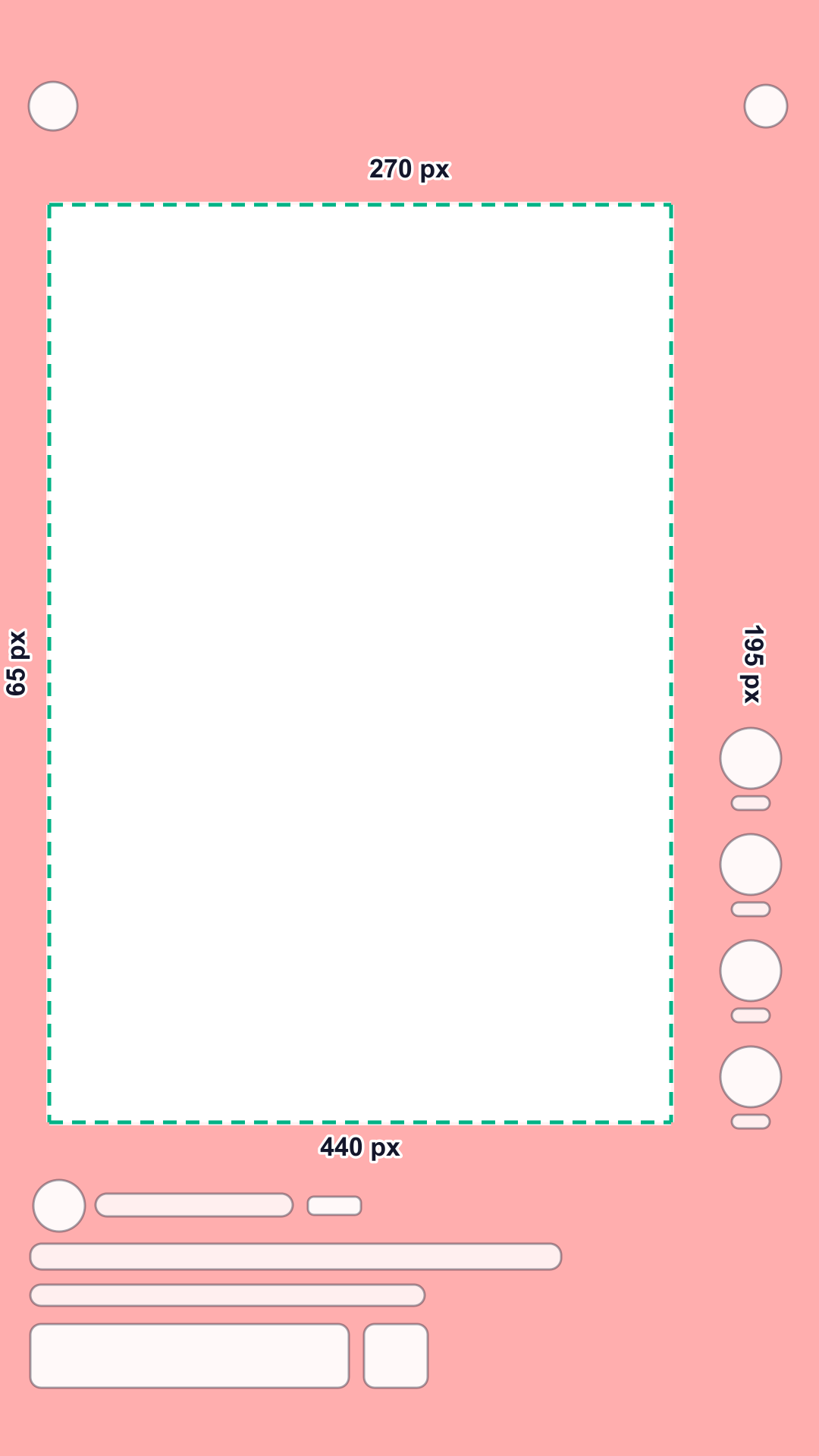
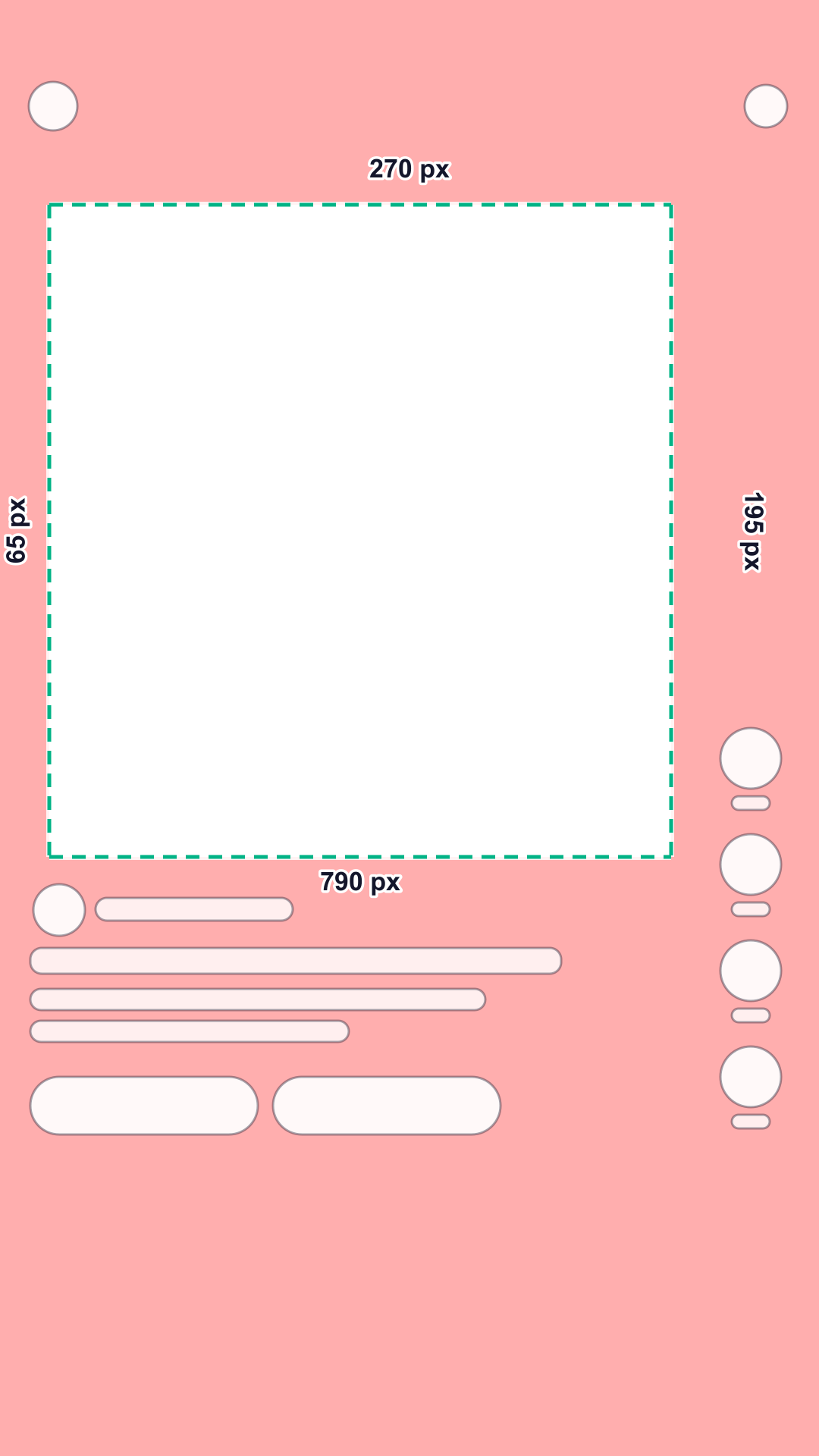
On a 1080 × 1920 full-screen Pin, Pinterest asks you to keep text and other elements inside an area that starts 270 px (14.1%) from the top, 65 px from the left and 195 px from the right, and ends 790 px (41.1%) above the bottom: 820 × 860 px for an organic Pin. For Idea ads, the full-screen Pin ad format, the bottom margin is 440 px (22.9%) instead, which leaves 820 × 1210 px. Pinterest prints no cut-out for a button column: the right margin runs the full height.
Check your video against the Pinterest safe zone
Pinterest is the one platform here that publishes numbers for organic Pins as well as ads, and the two differ at the bottom: a Pin reserves far more room for the title, description and buttons than an Idea ad. Check your footage against both.
Your file stays on your device: nothing is uploaded.
Interface shapes are schematic: they show where the app’s buttons and text sit, not how they look. Red areas are the platform’s unsafe zones.
Turn on JavaScript to check your own video. The template above and the numbers below work without it.
Need videos like this for a whole catalog? Request a pilot
Pinterest safe zone in numbers
Pixels on a 1080 × 1920 frame and share of the frame; x and y count from the top left corner. The zone scales with any 9:16 resolution.
| Placement | Top | Bottom | Left | Right | Button column | Largest clear area |
|---|---|---|---|---|---|---|
| Organic Pin1 official | 270 px14.1% | 790 px41.1% | 65 px6% | 195 px18.1% | inside the margins | 820 × 860 pxx 65–885, y 270–1130 |
| Idea ad2 official | 270 px14.1% | 440 px22.9% | 65 px6% | 195 px18.1% | inside the margins | 820 × 1210 pxx 65–885, y 270–1480 |
What covers each edge
- Top: back arrow, menu
- Right side: save, share, more
- Bottom: advertiser name, title, ad label, call-to-action button (ads)
What to keep inside the safe zone
- LogoAt least 270 px from the top and 65 px from the side, clear of the back arrow and the menu at the top.
- ProductCenter of the frame, above y = 1480 for Idea ads and above y = 1130 for organic Pins.
- Price and offerUpper half of the frame: below y = 1130 an organic Pin shows its title, description and buttons.
- SubtitlesLast line above y = 1130 if the same video also runs as an organic Pin, and lines ending before x = 885.
- FaceWell inside the safe area, away from the right margin where Pinterest places its buttons.
- DisclaimersAbove y = 1130, the higher of the two bottom limits, so the text stays visible on both.
What else Pinterest says
Pinterest prints its safe zone in pixels, with no diagram and no percentages, and does not name the canvas next to the numbers. Its Pin spec guide recommends 1080 × 1920 px for full-screen video, so every pixel value on this page is applied to that frame. At other sizes, use the percentages in the table.
Organic Pins and Idea ads share the same top, left and right margins and differ only at the bottom: 790 px for a Pin and 440 px for an Idea ad, 350 px less. The same figures appear under Image Pin specs and Video Pin specs.
Idea ads are Pinterest’s full-screen vertical Pin ads, used in paid campaigns or to earn organic reach. We found no safe zone printed for standard image and video ads on Pinterest’s ad spec page, so those are not covered here; Pinterest recommends square or vertical video for them.
Showcase ads follow their own rule for the card: no text or important information in the bottom 80 px, because it is covered.
Common mistakes
- Reusing a Reels or TikTok template: Pinterest’s right margin is 195 px along the whole height, and an organic Pin’s bottom margin is 790 px, deeper than either of theirs.
- Designing for the Idea ad bottom (440 px) and posting the same video as an organic Pin: text between y = 1130 and y = 1480 is covered by the title and description.
- Text in the right margin: the 195 px strip is for Pinterest’s buttons, not for your layout.
- Treating the percentages as official: Pinterest publishes pixels; the percentages here are those pixels on a 1080 × 1920 frame.
Questions
What is the Pinterest safe zone?
Pinterest asks you to keep text and other elements inside a safe area: 270 px from the top, 65 px from the left, 195 px from the right and 790 px from the bottom for an organic Pin, 440 px for an Idea ad. On a 1080 × 1920 frame that leaves 820 × 860 px for a Pin and 820 × 1210 px for an Idea ad.
Is the safe zone the same for ads and organic Pins?
The top and sides are the same. The bottom differs: 790 px for an organic Pin, 440 px for an Idea ad. If one video runs as both, design for the deeper bottom.
Does Pinterest say which canvas the numbers refer to?
Not next to the numbers. The same guide recommends 1080 × 1920 px for full-screen video, so we apply the pixels to that frame and show the percentages for other sizes.
Is there a safe zone for standard video ads?
We found none on Pinterest’s ad spec page (checked October 29, 2026). Its numbers are for Pins and Idea ads; for other formats, check the preview in Pinterest Ads Manager.
Do the numbers work at other 9:16 resolutions?
Yes. Scale the pixels by your frame width divided by 1080, or use the percentages in the table.
Is my video uploaded anywhere?
No. The checker runs in your browser: the file opens on your device and is never sent to Quelta or anyone else.
Other platforms and tools
TikTok safe zone: template and checker
Top 240 px, bottom 660 px, 120 px on the sides and a button column. Product-link ads and the Arabic layout too.
Instagram Reels safe zone: template and checker
Top 14%, bottom 35%, 6% on the sides. One zone for Reels and Stories ads; disclaimers need more room.
YouTube Shorts safe zone: template and checker
Top 288 px, bottom 672 px, 48 px on the left and 192 px on the right: Google’s numbers for vertical ads.
Snapchat safe zone: template and checker
Top 10%, bottom 35%, 6% on the sides and a button column. Snap’s single-ad page is shorter: 150 px and 330 px.
All platforms compared
The numbers side by side and one combined zone for a video that runs everywhere.
Video requirements by marketplace
Length, format, resolution and file size for Amazon, Etsy, TikTok Shop, Shopify and Mercado Libre, with a file check.
Sources
Every number comes from the platform’s own help page or template file. Quotes are verbatim; all sources were checked on October 29, 2026.
- Pinterest Help: Review Pin specs, checked October 29, 2026
Safe zones Put text and other elements within the dimensions below, so users can easily see on any device when viewing. Top : 270 px Left: 65 px Right : 195 px Bottom : 790 px
- Pinterest Help: Ad product specs (Idea ads, Showcase ads), checked October 29, 2026
Safe zones Put text and other elements within the dimensions below, so users can easily see on any device when viewing. Top: 270 px Left: 65 px Right: 195 px Bottom: 440 px
Quelta for catalogs
Need videos like this for your whole catalog?
Quelta makes product videos from your photos, adapted for each of your markets by meaning, not just by words, and checked before delivery. Start with a pilot on one category.
Start with a pilotPrivate access
Videos for your catalog, starting with one category
Tell us about your catalog, markets and volumes. We make the first videos for one category, so you can compare them with what you have now. Then the same scenarios cover the whole catalog.
Send your products
A product feed, links to product pages or photos for one category.
Agree markets and audiences
Countries, languages, platforms, generations of buyers and the quality threshold.
Get the pilot videos
Localized for each market, checked and ready to post.
Scale to the catalog
Every product, every market and every new arrival, in one style.
We don’t copy other people’s videos. Every video is new and about your product. We keep the mechanics that sell (script, pacing, delivery), not anyone’s footage, people or music.