Free tool · Snapchat
Snapchat safe zone: template and checker
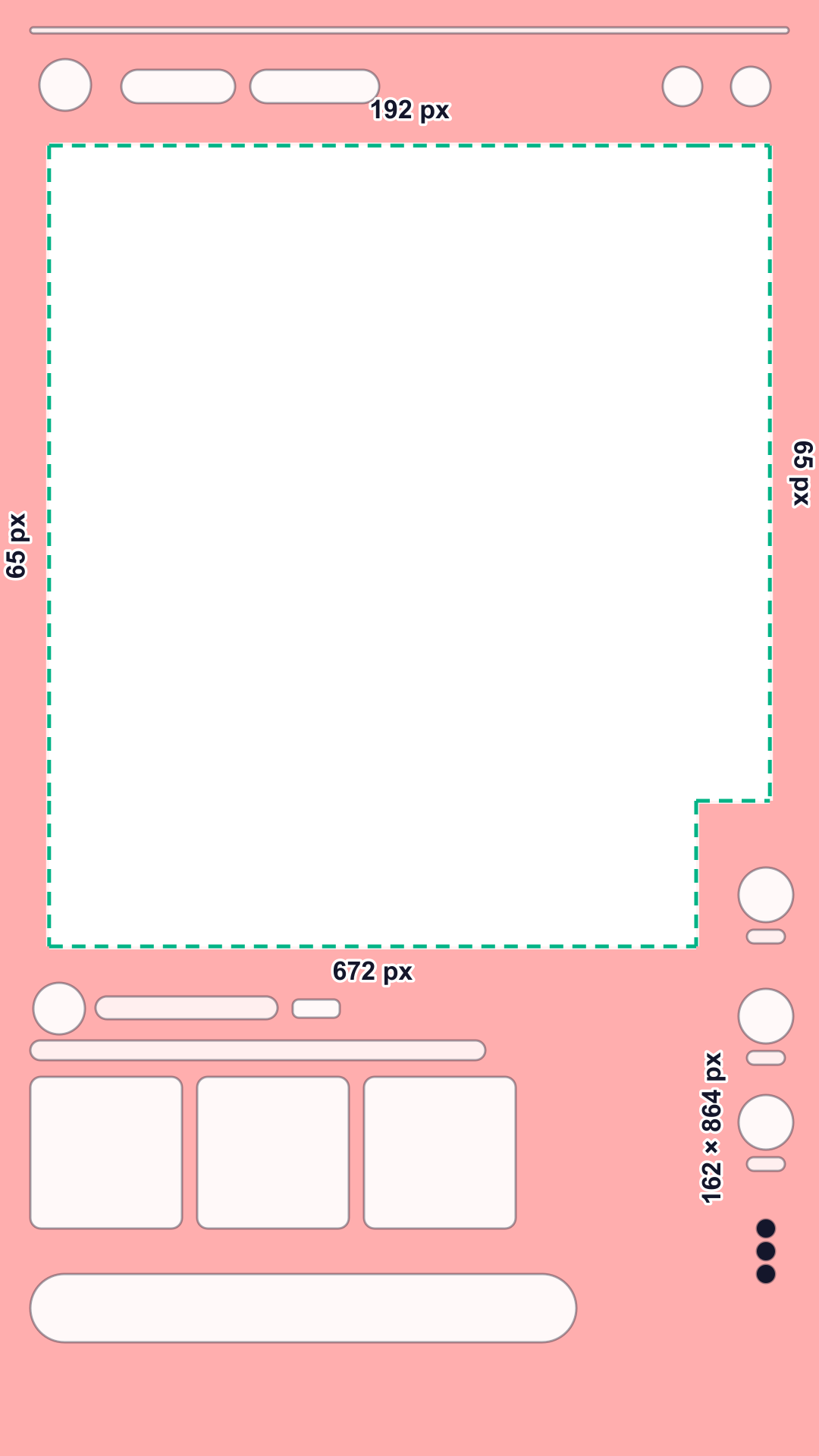
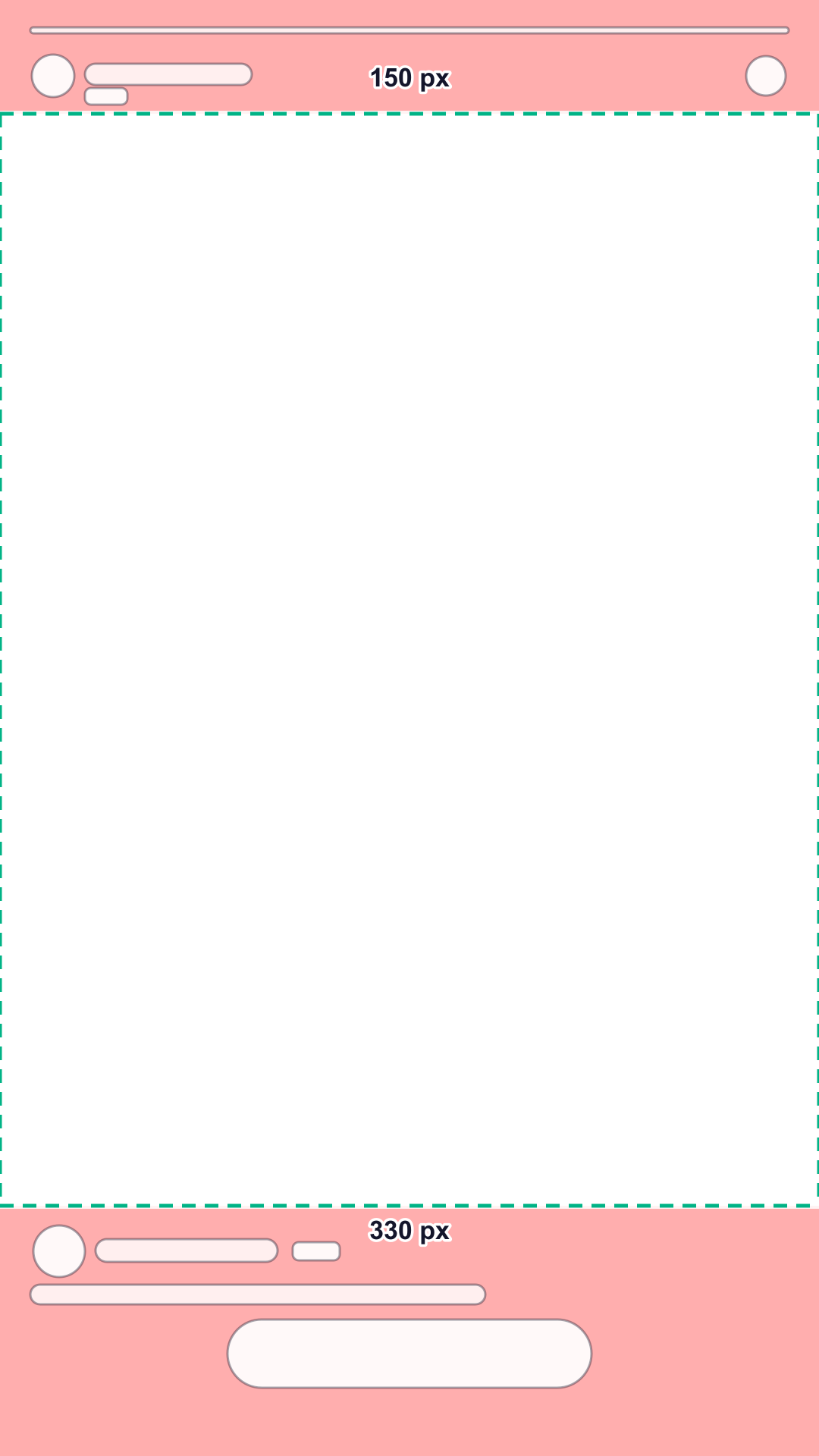
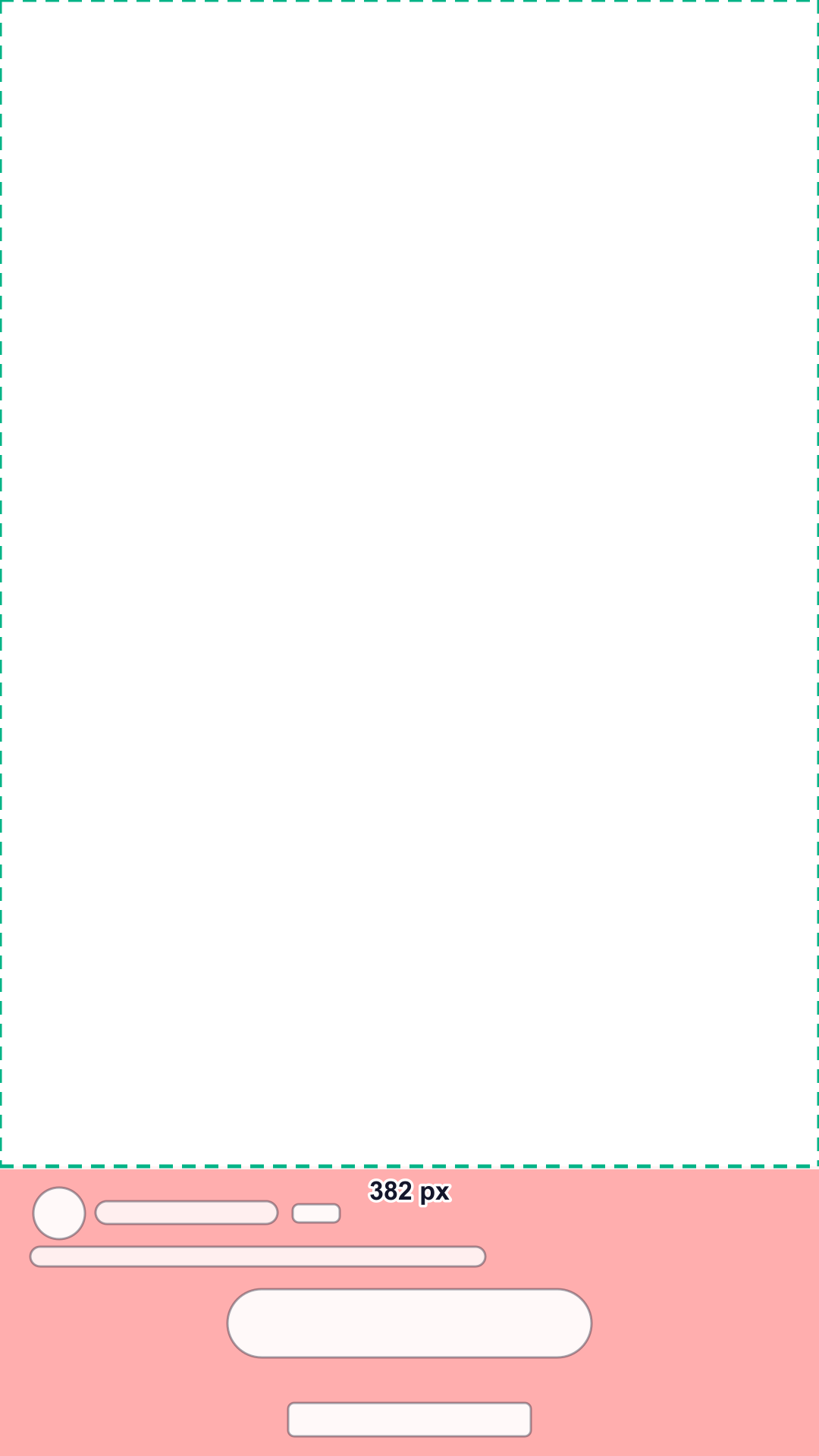
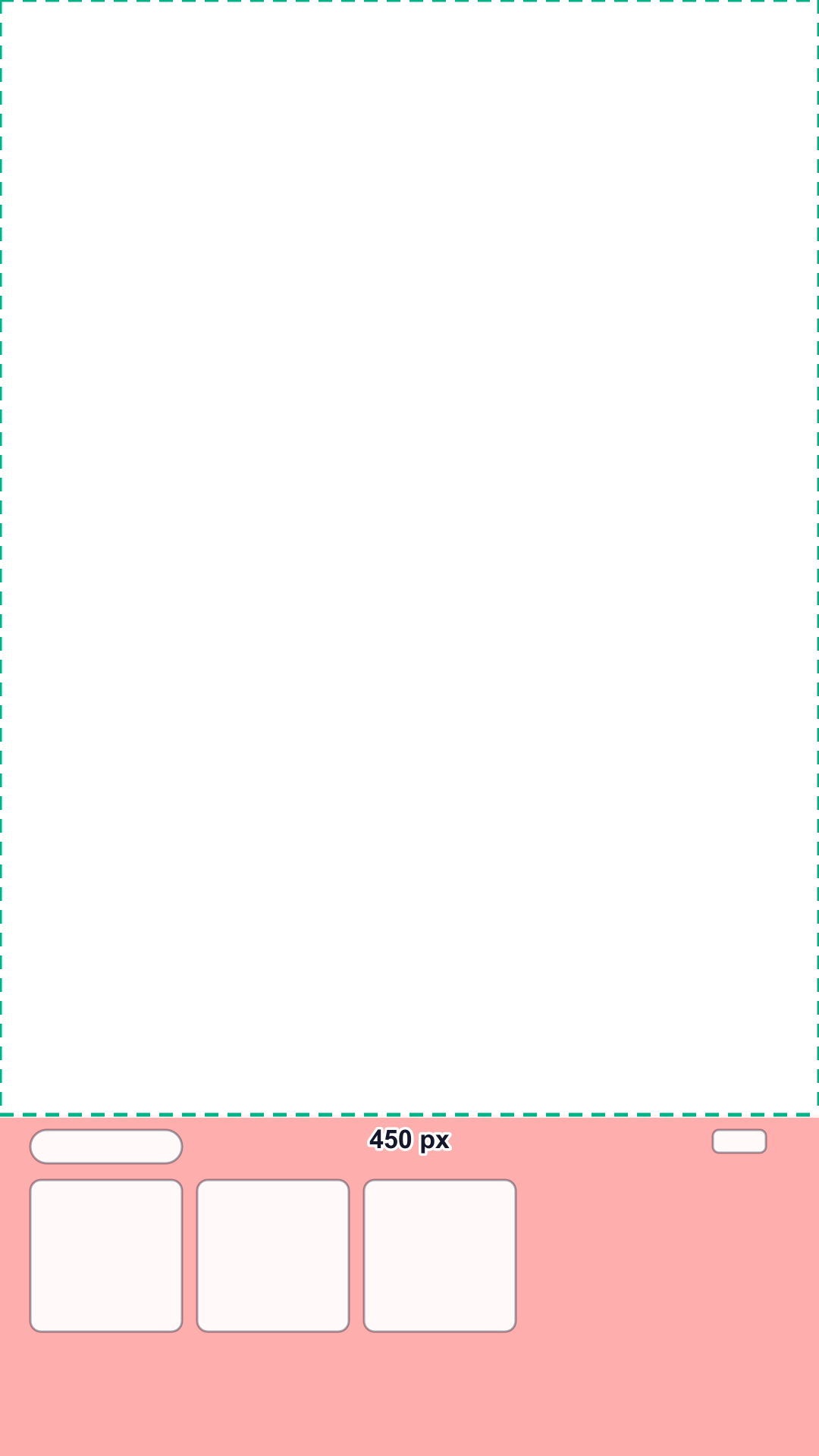
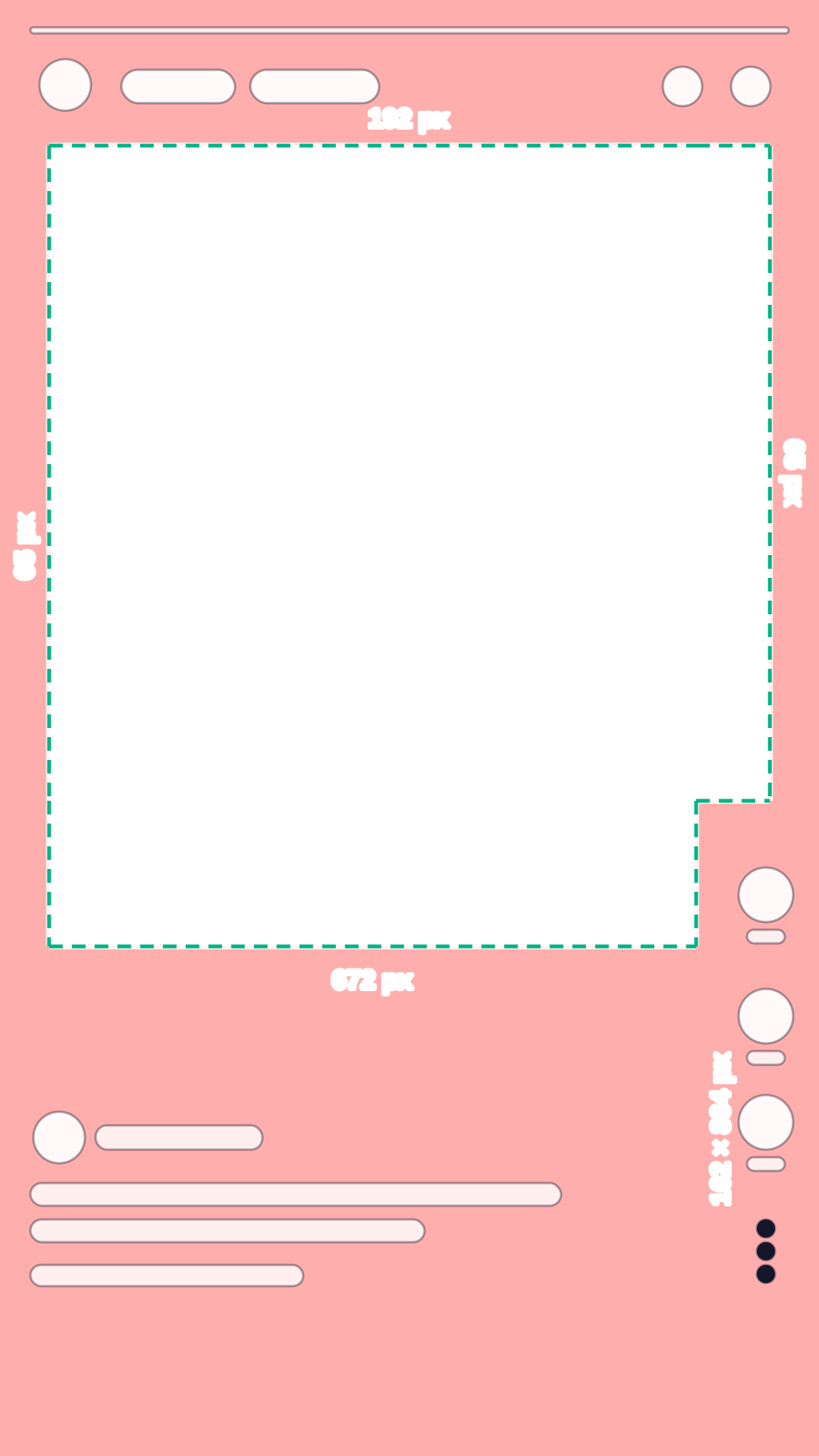
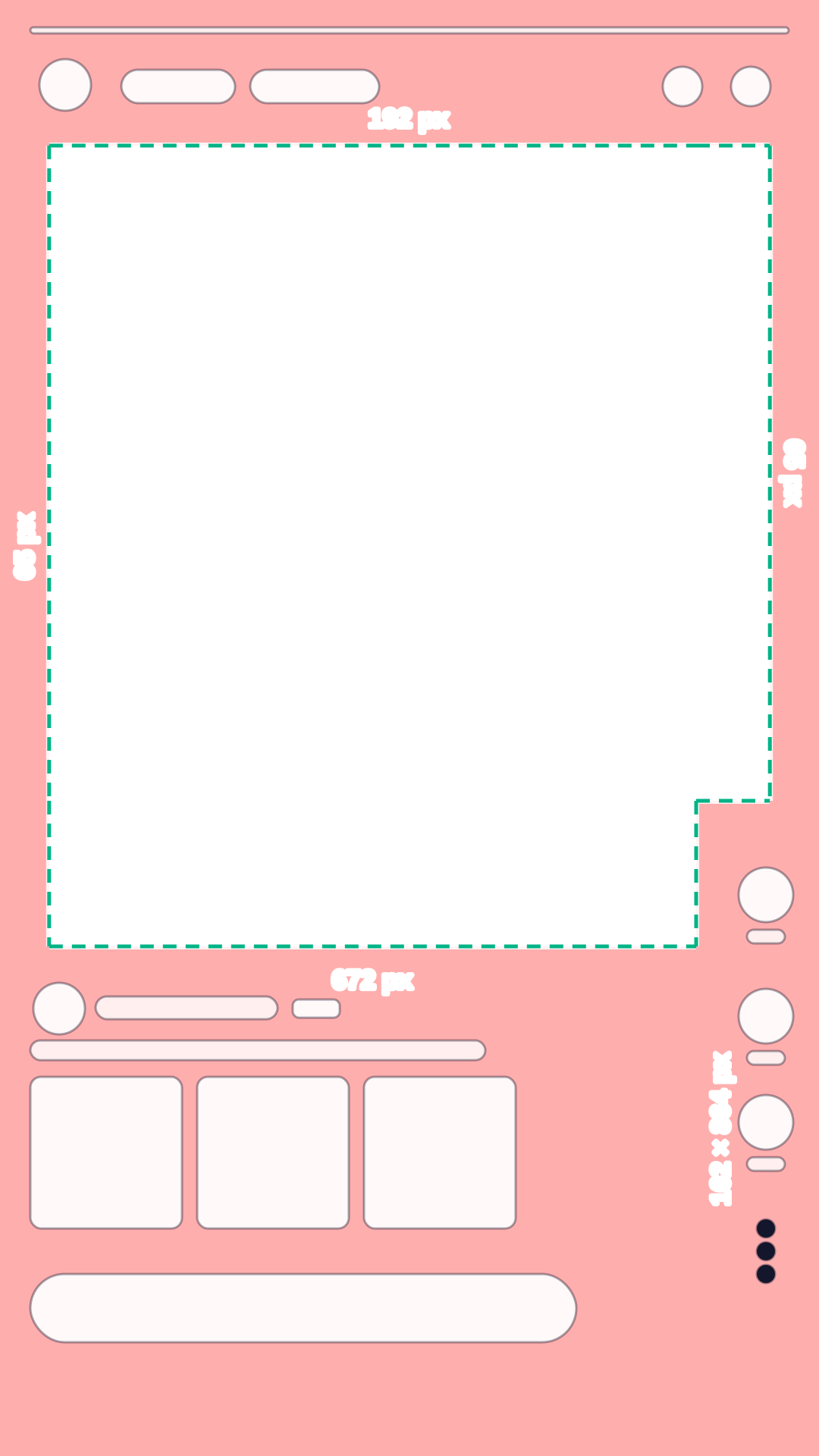
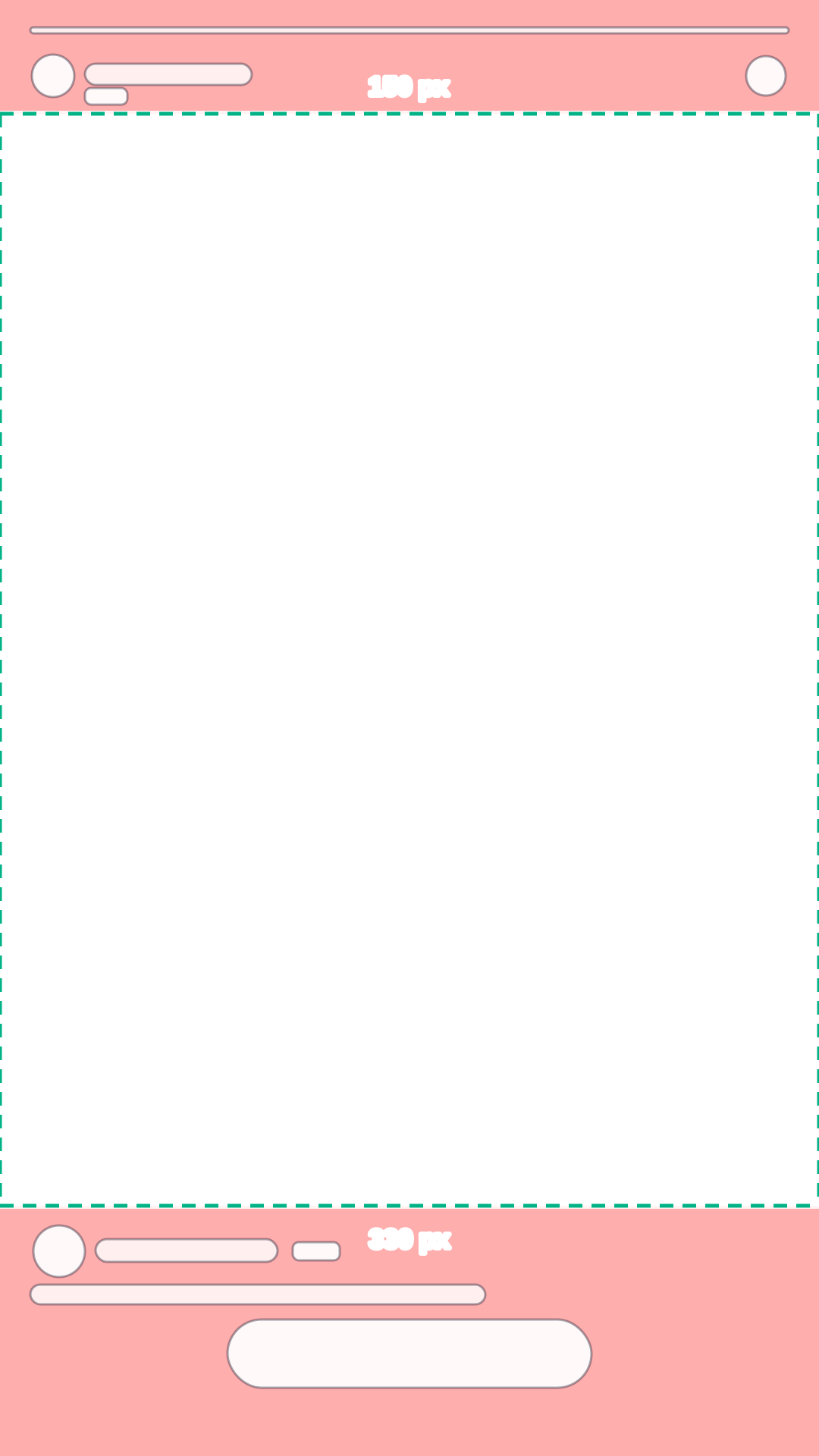
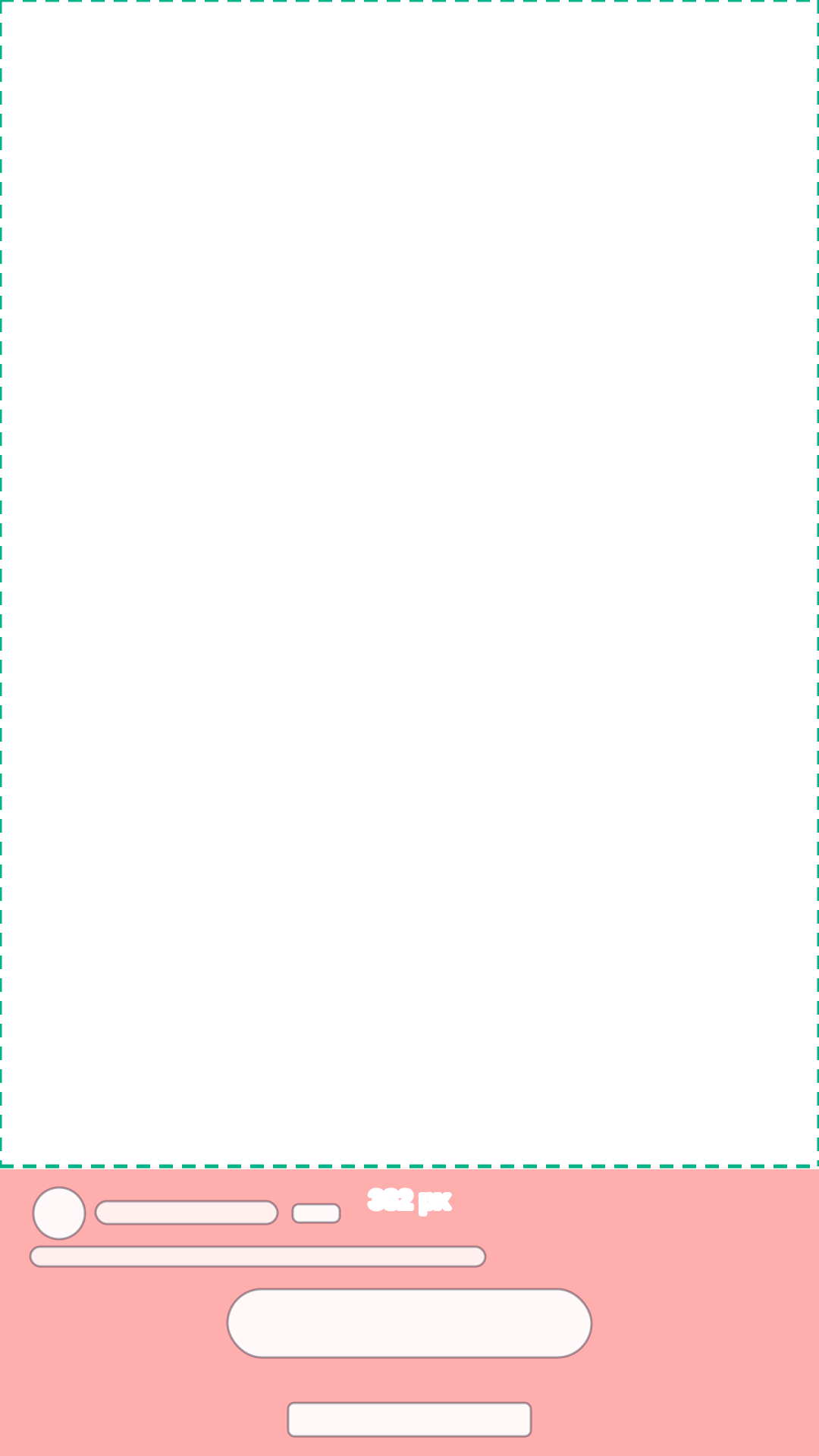
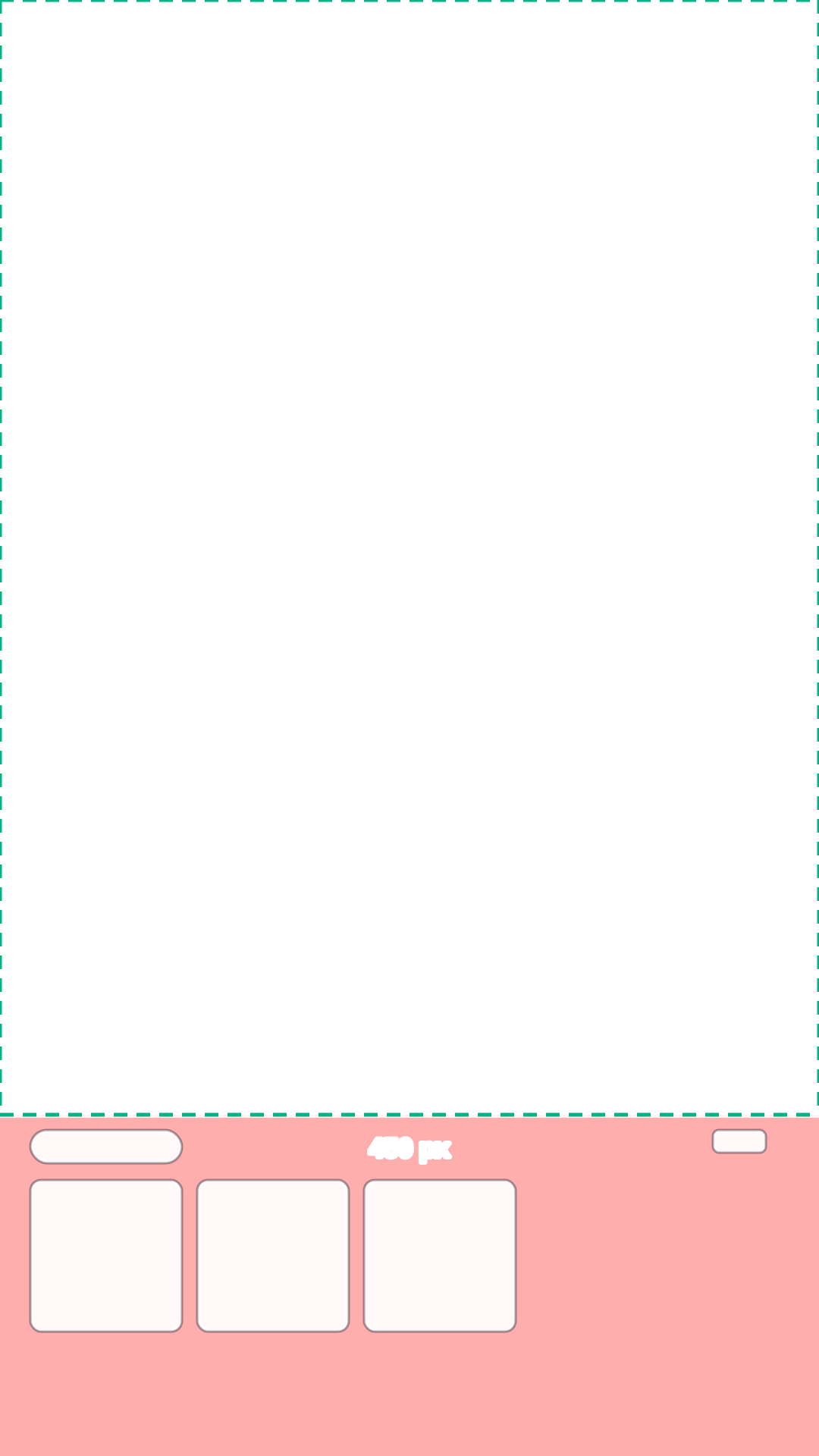
On a 1080 × 1920 Snapchat ad, Snap’s safe zone diagram keeps the top 10% (192 px), the bottom 35% (672 px) and 6% (65 px) on each side free of text, logos and key elements, plus the button column in the lower right: 15% of the width and 45% of the height (162 × 864 px). Snap’s best-practices page for single image and video ads is shorter, asking only for the top 150 px and the bottom 330 px; ads with Offer Details need the bottom 382 px, and Collection ads the bottom 450 px.
Check your video against the Snapchat safe zone
Snapchat puts its brand name, headline, call-to-action and progress bar over the top and bottom of every full-screen ad, and Spotlight adds a button column on the right. Snap states its margins in four places that do not match, so this page shows them side by side and lets you check your footage against each one.
Your file stays on your device: nothing is uploaded.
Interface shapes are schematic: they show where the app’s buttons and text sit, not how they look. Red areas are the platform’s unsafe zones.
Turn on JavaScript to check your own video. The template above and the numbers below work without it.
Need videos like this for a whole catalog? Request a pilot
Snapchat safe zone in numbers
Pixels on a 1080 × 1920 frame and share of the frame; x and y count from the top left corner. The zone scales with any 9:16 resolution.
| Placement | Top | Bottom | Left | Right | Button column | Largest clear area |
|---|---|---|---|---|---|---|
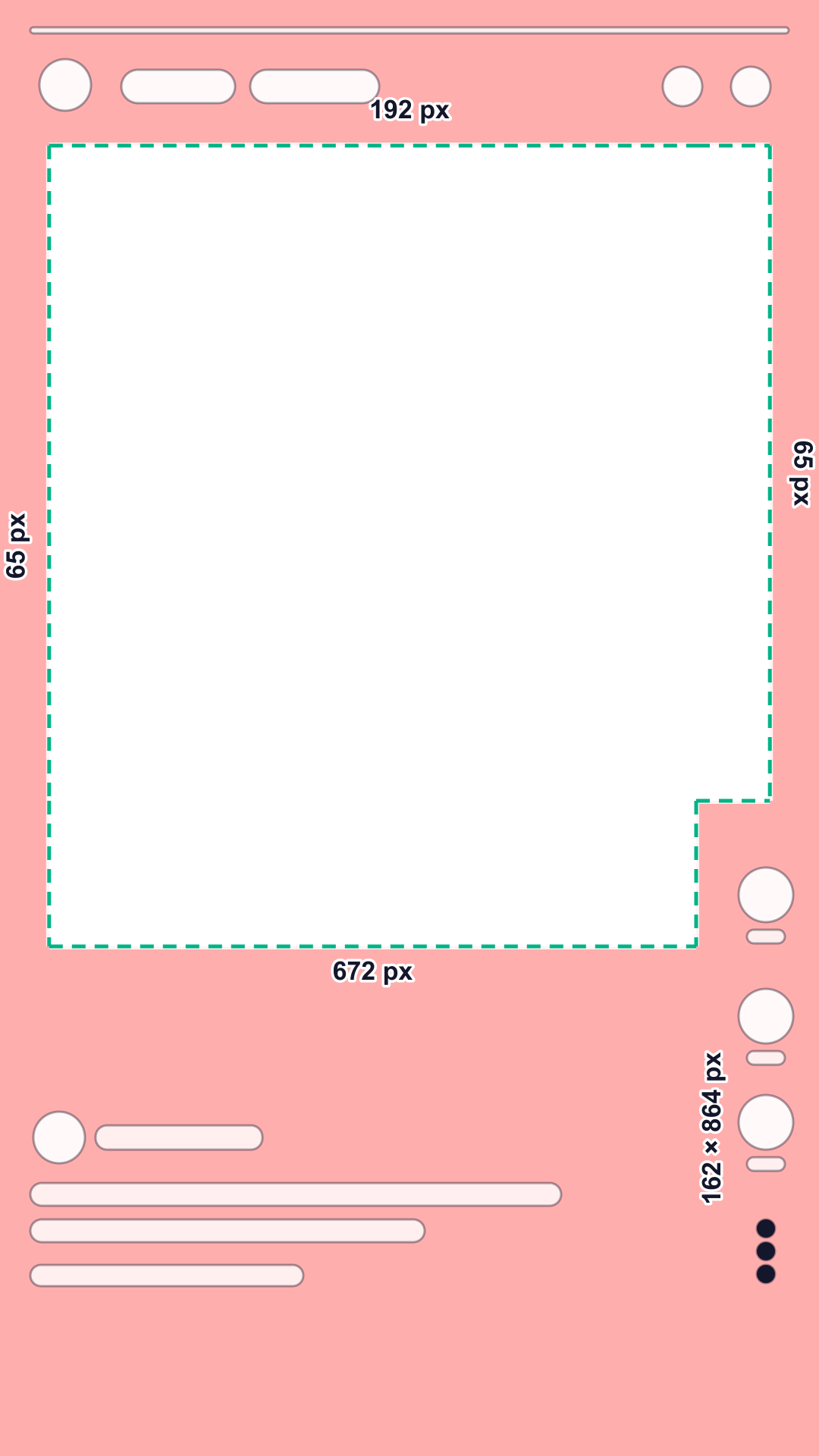
| Organic post1 not published: ad zone | 192 px10% | 672 px35% | 65 px6% | 65 px6% | 162 × 864 pxy ≥ 1056 | 853 × 1056 pxx 65–918, y 192–1248 |
| Ad, all formats (diagram)1 official | 192 px10% | 672 px35% | 65 px6% | 65 px6% | 162 × 864 pxy ≥ 1056 | 853 × 1056 pxx 65–918, y 192–1248 |
| Single image or video ad3 official | 150 px7.8% | 330 px17.2% | not stated | not stated | not stated | y 150–1590 |
| Ad with Offer Details4 official | not stated | 382 px19.9% | not stated | not stated | not stated | y 0–1538 |
| Collection ad5 official | not stated | 450 px23.4% | not stated | not stated | not stated | y 0–1470 |
What covers each edge
- Top: feed tabs, progress bar, brand name, menu
- Right side: profile photo, like, share, more
- Bottom: brand name, headline, ad label, product tiles (Collection ads), call-to-action button (ads)
What to keep inside the safe zone
- LogoAt least 192 px from the top and 65 px from the side. The top strip holds the progress bar and the brand name.
- ProductCenter of the frame, above y = 1248. Below it sit the brand name, the headline, the call-to-action and, in Collection ads, the product tiles.
- Price and offerUpper half or center, never in the bottom 35%: that is where Snapchat shows its own text and buttons.
- SubtitlesLast line above y = 1248. Below y = 1056, end lines before x = 918, where the button column starts.
- FaceWell inside the safe area, away from the top and side edges.
- DisclaimersSnap asks for legal text well above the bottom buffer. Keep it above y = 1248; the single-ad figure is 330 px, and 382 px with Offer Details.
What Snap says, and where its numbers differ
Snap’s Safe Zones article shows one diagram for all formats and says the same spec applies across Stories, Spotlight and Commercials. Its text names no numbers: they are the labels on the diagram, so this page reads them from the image and lists the image among the sources.
The best-practices page for single image and video ads is shorter: the top 150 px (7.8%) and the bottom 330 px (17.2%) of the canvas, nothing for the sides. Most guides repeat that figure, but it covers less than the diagram, which reserves 672 px at the bottom. If you build one master for several placements, use the larger zone.
Ads with an Offer Details button need a deeper bottom buffer: 382 px instead of 330 px. Collection ads reserve the bottom 450 px for the product tiles; Snap lists 450 px, 330 px and 330 px for two, three and four tiles, and 480 px, 420 px and 375 px when Offer Details are on.
For eligible ads Snap may choose the call-to-action format and position dynamically, and those variants do not appear in Ads Preview. Snap’s advice is to keep logos, taglines, disclaimers and calls to action inside the safe zone and to check the alignment with the Safe Zone toggle in Ads Manager.
Snap publishes safe zones for ads only. Organic Snaps and Spotlight videos show the same tabs, buttons and captions in the same places, so the ad zone is the safe choice for both. The full-screen canvas Snap specifies is 1080 × 1920 px.
Snapchat safe zone templates: PNG and SVG
1080 × 1920 with a transparent background. Put the PNG on the top layer in CapCut, Premiere Pro, After Effects or Canva and hide it before export.
Common mistakes
- Treating the single-ad figure as the whole story: 150 px at the top and 330 px at the bottom leave no side margin and no button column, while Snap’s diagram reserves 65 px per side and a 162 × 864 px column.
- Key text in the lower right corner: the profile, like and share buttons cover a 162 × 864 px block there.
- A call to action burned into the very bottom: Snapchat adds its own, and may change its format dynamically.
- Judging by Ads Preview alone: dynamic call-to-action variants do not appear in it, so check against the safe zone instead.
Questions
What is the Snapchat safe zone?
Snap’s diagram keeps the top 10%, the bottom 35% and 6% on each side free of text, logos and key elements. On a 1080 × 1920 ad that is 192 px at the top, 672 px at the bottom and 65 px on each side, plus a 162 × 864 px button column in the lower right. For single image and video ads, Snap’s best-practices page asks for the top 150 px and the bottom 330 px.
Why do Snap’s numbers differ from page to page?
Snap states them in different places: a diagram in the Safe Zones article for all formats, and shorter pixel figures in the pages for single image and video ads, Offer Details and Collection ads. This page shows each as published. The diagram is the largest, so it is the safe choice for one master video.
Is there a safe zone for Spotlight or organic Snaps?
Snap publishes safe zones for ads only, and its article says one spec applies across Stories, Spotlight and Commercials. Organic content shows the same interface without the ad label and button, so the ad zone works for both.
What changes with Offer Details or Collection ads?
With an Offer Details button the bottom buffer is 382 px instead of 330 px. Collection ads reserve the bottom 450 px for the product tiles, and 480 px, 420 px or 375 px for two, three or four tiles with Offer Details.
How do I see the safe zone in Ads Manager?
Use the Safe Zone toggle while you review the creative. Dynamic call-to-action variants do not show in Ads Preview, so keep your key elements inside the zone anyway.
Is my video uploaded anywhere?
No. The checker runs in your browser: the file opens on your device and is never sent to Quelta or anyone else.
Other platforms and tools
TikTok safe zone: template and checker
Top 240 px, bottom 660 px, 120 px on the sides and a button column. Product-link ads and the Arabic layout too.
Instagram Reels safe zone: template and checker
Top 14%, bottom 35%, 6% on the sides. One zone for Reels and Stories ads; disclaimers need more room.
YouTube Shorts safe zone: template and checker
Top 288 px, bottom 672 px, 48 px on the left and 192 px on the right: Google’s numbers for vertical ads.
Pinterest safe zone: template and checker
Top 270 px, 65 px left, 195 px right; the bottom is 790 px for organic Pins and 440 px for Idea ads.
All platforms compared
The numbers side by side and one combined zone for a video that runs everywhere.
Video requirements by marketplace
Length, format, resolution and file size for Amazon, Etsy, TikTok Shop, Shopify and Mercado Libre, with a file check.
Sources
Every number comes from the platform’s own help page or template file. Quotes are verbatim; all sources were checked on October 29, 2026.
- Snapchat Business Help Center: Safe Zones for Ads on Snapchat, checked October 29, 2026
Each format has defined top, bottom, and side buffers that help keep critical elements visible. To review creative alignment, use the Safe Zone toggle in Ads Manager.
- Snapchat Business Help Center: safe zone diagram (image on the Safe Zones article), checked October 29, 2026
Diagram showing a phone screen with the unsafe area shaded red. (labels: 6%, 6%, 10%, 35%, 45%, 15%)
- Snapchat Business Help Center: Single Image or Video Creative Best Practices, checked October 29, 2026
Keep the top 150px and the bottom 330px of your canvas clear graphics or logos to prevent overlap with the Snapchat ad UI elements. Review Safe Zones for Ads on Snapchat for full details.
- Snapchat Business Help Center: Include an Ad Disclaimer (Offer Details), checked October 29, 2026
The Offer Details button takes up additional space on screen, so naturally increases the buffer zones at the bottom of the ad. … For web view ads (meaning Story Ads or Single Image or Video ads with a website attachment), the buffer zone is: 382px from the bottom (compared to 330px without offer details)
- Snapchat Business Help Center: Collection Ad Specifications, checked October 29, 2026
Avoid placing critical graphics, logos, messaging, visual indicators or legal language in the bottom 450px of the image or video.
- Snapchat Business Help Center: Single Image or Video Specifications, checked October 29, 2026
Full Screen Canvas 1080 x 1920px 9:16 aspect ratio Scaled proportionally to original asset
Quelta for catalogs
Need videos like this for your whole catalog?
Quelta makes product videos from your photos, adapted for each of your markets by meaning, not just by words, and checked before delivery. Start with a pilot on one category.
Start with a pilotPrivate access
Videos for your catalog, starting with one category
Tell us about your catalog, markets and volumes. We make the first videos for one category, so you can compare them with what you have now. Then the same scenarios cover the whole catalog.
Send your products
A product feed, links to product pages or photos for one category.
Agree markets and audiences
Countries, languages, platforms, generations of buyers and the quality threshold.
Get the pilot videos
Localized for each market, checked and ready to post.
Scale to the catalog
Every product, every market and every new arrival, in one style.
We don’t copy other people’s videos. Every video is new and about your product. We keep the mechanics that sell (script, pacing, delivery), not anyone’s footage, people or music.